 Vibe Code New Hope
Claude Code Cheat Sheet
សន្លឹកជំនួយការចងចាំ Claude Code
From an idea to a live website — the four tools we used, and how they fit together.
ពីគំនិតមួយ ទៅជាគេហទំព័រដែលដំណើរការលើអ៊ីនធឺណិត — ឧបករណ៍ទាំងបួនដែលយើងបានប្រើ និងរបៀបដែលវាភ្ជាប់គ្នា។
Claude Code
Claude Code runs on your computer and writes code for you. You describe what you want in plain words — it builds it.
Claude Code ដំណើរការលើកុំព្យូទ័ររបស់អ្នក ហើយសរសេរកូដជំនួសអ្នក។ អ្នកគ្រាន់តែពិពណ៌នាអ្វីដែលអ្នកចង់បានដោយពាក្យសាមញ្ញ — វានឹងបង្កើតវាឱ្យ។
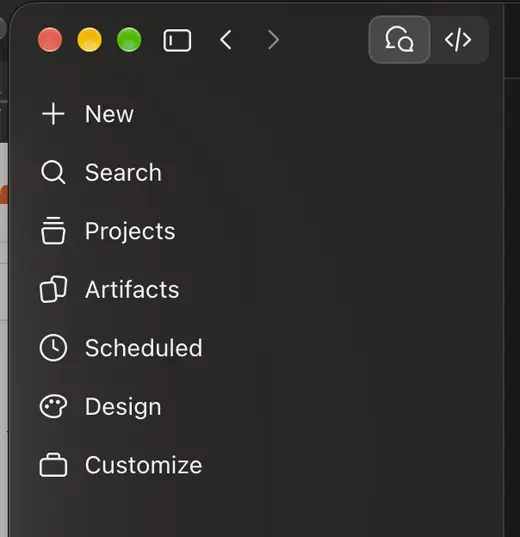
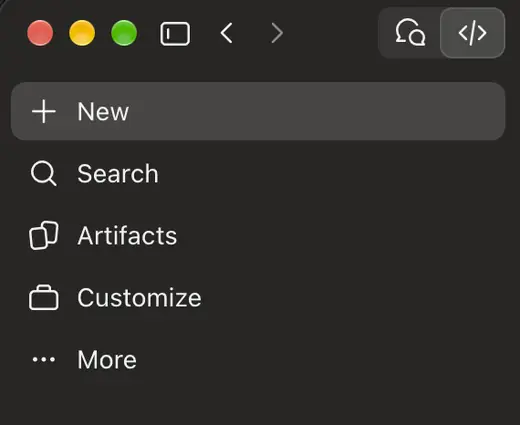
In the Claude app, the toggle at the top switches modes: Chat is the left button, Code is the right button.
នៅក្នុងកម្មវិធី Claude ប៊ូតុងនៅខាងលើប្រើសម្រាប់ប្តូររបៀប៖ Chat (ជជែក) នៅខាងឆ្វេង និង Code (កូដ) នៅខាងស្តាំ។
GitHub & git
GitHub stores your code on the internet, so you can open it from another computer or work together with other coders. git is the tool that sends your code there.
GitHub រក្សាទុកកូដរបស់អ្នកនៅលើអ៊ីនធឺណិត ដូច្នេះអ្នកអាចបើកវាពីកុំព្យូទ័រផ្សេង ឬសហការជាមួយអ្នកសរសេរកូដផ្សេងទៀតបាន។ git គឺជាឧបករណ៍ដែលបញ្ជូនកូដរបស់អ្នកទៅទីនោះ។
Cloudflare
Cloudflare puts your code on the internet as a public website, with a free workers.dev address.
Cloudflare ដាក់កូដរបស់អ្នកលើអ៊ីនធឺណិត ជាគេហទំព័រសាធារណៈ ដោយមានអាសយដ្ឋាន workers.dev ឥតគិតថ្លៃ។
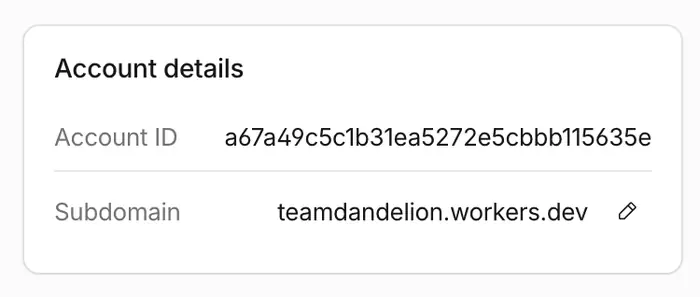
Don't like my-account? On the Workers & Pages page, find Account details and click the pencil next to Subdomain. Note: this changes the address of every site on your account.
មិនចូលចិត្តឈ្មោះ my-account? នៅលើទំព័រ Workers & Pages រក Account details ហើយចុចរូបខ្មៅដៃនៅជាប់ Subdomain។ ចំណាំ៖ វានឹងប្តូរអាសយដ្ឋានរបស់គេហទំព័រទាំងអស់ក្នុងគណនីរបស់អ្នក។
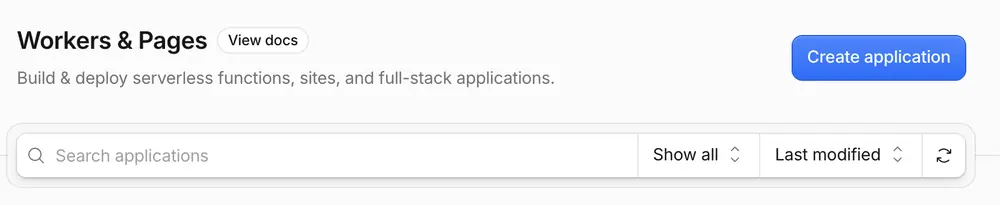
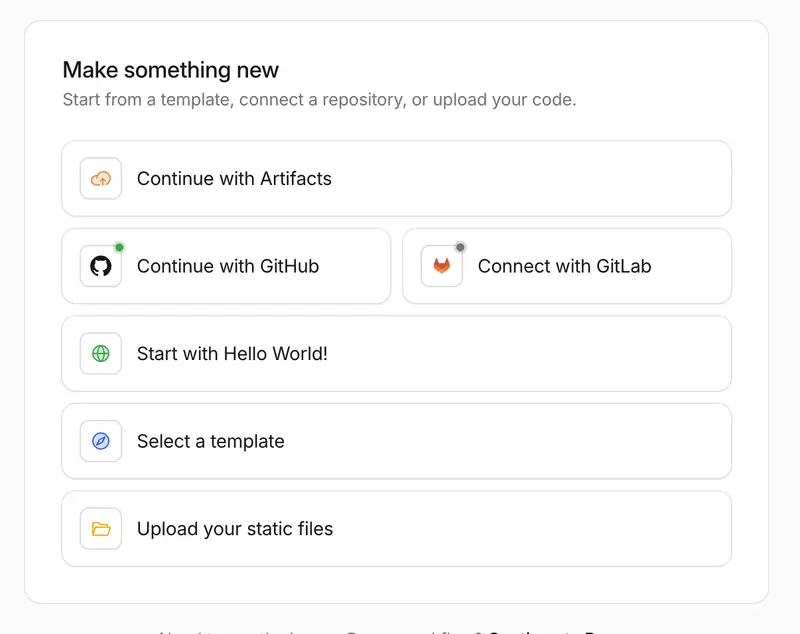
Open Workers & Pages and click the blue Create application button.
បើក Workers & Pages រួចចុចប៊ូតុងពណ៌ខៀវ Create application។
Click Continue with GitHub, then pick your repository and deploy. Each time you push to GitHub, your site updates by itself.
ចុច Continue with GitHub បន្ទាប់មកជ្រើសរើស repository របស់អ្នក ហើយ deploy។ រាល់ពេលអ្នក push ទៅ GitHub គេហទំព័ររបស់អ្នកនឹងធ្វើបច្ចុប្បន្នភាពដោយខ្លួនឯង។
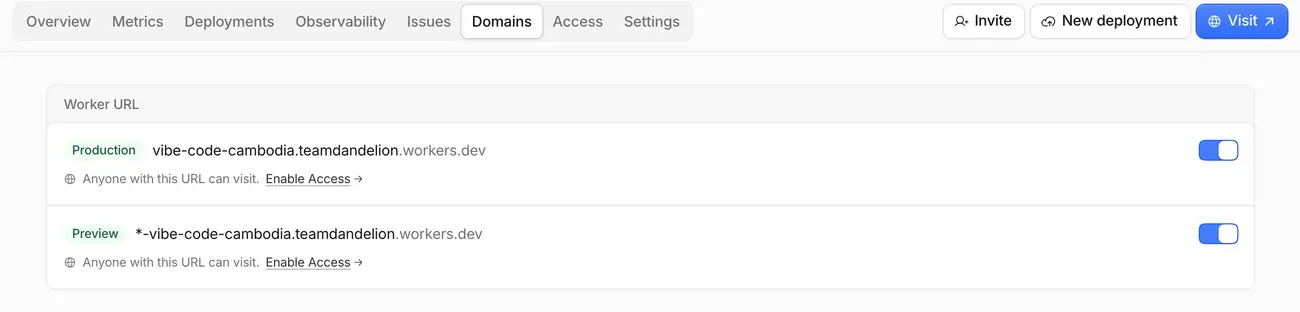
Open the Domains tab and turn ON the toggles next to your workers.dev URLs (they turn blue). If they're off, your website address won't open.
បើកផ្ទាំង Domains ហើយបើក (ON) ប៊ូតុងបិទ/បើក នៅជាប់អាសយដ្ឋាន workers.dev របស់អ្នក (វានឹងប្រែជាពណ៌ខៀវ)។ ប្រសិនបើវាបិទ អាសយដ្ឋានគេហទំព័ររបស់អ្នកនឹងមិនបើកទេ។
Namecheap
Namecheap lets you buy a cheap domain name when you want your own custom address instead of workers.dev.
Namecheap អនុញ្ញាតឱ្យអ្នកទិញឈ្មោះដែន (domain) ក្នុងតម្លៃថោក នៅពេលអ្នកចង់បានអាសយដ្ឋានផ្ទាល់ខ្លួន ជំនួសឱ្យ workers.dev។
Stuck? Ask Claude.
ជាប់គាំង? សួរ Claude។
You can always ask Claude for help — and Claude speaks Khmer! Ask in Khmer and it will answer in Khmer.
អ្នកអាចសុំជំនួយពី Claude បានជានិច្ច — ហើយ Claude ចេះនិយាយភាសាខ្មែរ! សួរជាភាសាខ្មែរ វានឹងឆ្លើយតបជាភាសាខ្មែរ។
Claude Design
Click Design in the Claude app sidebar to make visuals just by describing them — social media posts, posters, flyers, landing page mockups. This cheat sheet was made with it!
ចុច Design នៅរបារចំហៀងនៃកម្មវិធី Claude ដើម្បីបង្កើតរូបភាព ដោយគ្រាន់តែពិពណ៌នាវា — ប្រកាសបណ្តាញសង្គម ផ្ទាំងរូបភាព ខិត្តប័ណ្ណ ឬគំរូគេហទំព័រ។ សន្លឹកជំនួយនេះក៏ត្រូវបានបង្កើតដោយវាដែរ!