 Vibe Code New Hope
This website · គេហទំព័រនេះ
new-hope.dandelion.art
Remember this address. Everything you need for class is here.ចងចាំអាសយដ្ឋាននេះ។ អ្វីៗទាំងអស់ដែលអ្នកត្រូវការសម្រាប់ថ្នាក់រៀន មាននៅទីនេះ។
Start here · ចាប់ផ្តើមនៅទីនេះ
Get the Claude appទាញយកកម្មវិធី Claude
- 1
Go to claude.ai/download and install the app for your computer (Mac or Windows).ចូលទៅកាន់ claude.ai/download ហើយដំឡើងកម្មវិធីសម្រាប់កុំព្យូទ័ររបស់អ្នក (Mac ឬ Windows)។
- 2
Open Claude and sign in with your Claude account.បើក Claude ហើយចូលដោយប្រើគណនី Claude របស់អ្នក។
- 3
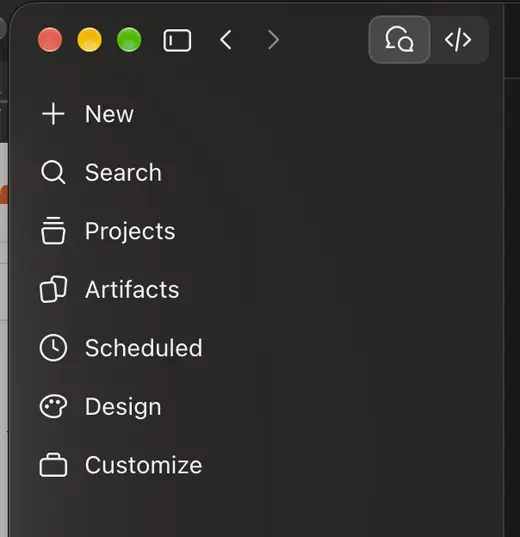
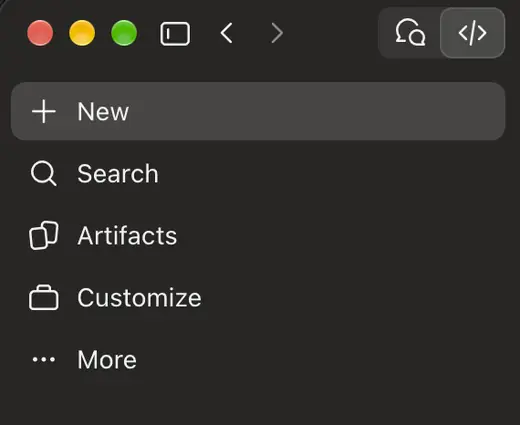
Click Code at the top, then follow the cheat sheet below.ចុច Code នៅខាងលើ បន្ទាប់មកធ្វើតាមសន្លឹកជំនួយខាងក្រោម។
On Windows? Install Git first. How?ប្រើ Windows? សូមដំឡើង Git ជាមុនសិន។
Claude Code Cheat Sheet
សន្លឹកជំនួយការចងចាំ Claude Code
From an idea to a live website — the four tools we used, and how they fit together.
ពីគំនិតមួយ ទៅជាគេហទំព័រដែលដំណើរការលើអ៊ីនធឺណិត — ឧបករណ៍ទាំងបួនដែលយើងបានប្រើ និងរបៀបដែលវាភ្ជាប់គ្នា។
Claude Code
Claude Code runs on your computer and writes code for you. You describe what you want in plain words — it builds it.
Claude Code ដំណើរការលើកុំព្យូទ័ររបស់អ្នក ហើយសរសេរកូដជំនួសអ្នក។ អ្នកគ្រាន់តែពិពណ៌នាអ្វីដែលអ្នកចង់បានដោយពាក្យសាមញ្ញ — វានឹងបង្កើតវាឱ្យ។
In the Claude app, the toggle at the top switches modes: Chat is the left button, Code is the right button.
នៅក្នុងកម្មវិធី Claude ប៊ូតុងនៅខាងលើប្រើសម្រាប់ប្តូររបៀប៖ Chat (ជជែក) នៅខាងឆ្វេង និង Code (កូដ) នៅខាងស្តាំ។
GitHub & git
GitHub stores your code on the internet, so you can open it from another computer or work together with other coders. git is the tool that sends your code there.
GitHub រក្សាទុកកូដរបស់អ្នកនៅលើអ៊ីនធឺណិត ដូច្នេះអ្នកអាចបើកវាពីកុំព្យូទ័រផ្សេង ឬសហការជាមួយអ្នកសរសេរកូដផ្សេងទៀតបាន។ git គឺជាឧបករណ៍ដែលបញ្ជូនកូដរបស់អ្នកទៅទីនោះ។
Cloudflare
Cloudflare puts your code on the internet as a public website, with a free workers.dev address.
Cloudflare ដាក់កូដរបស់អ្នកលើអ៊ីនធឺណិត ជាគេហទំព័រសាធារណៈ ដោយមានអាសយដ្ឋាន workers.dev ឥតគិតថ្លៃ។
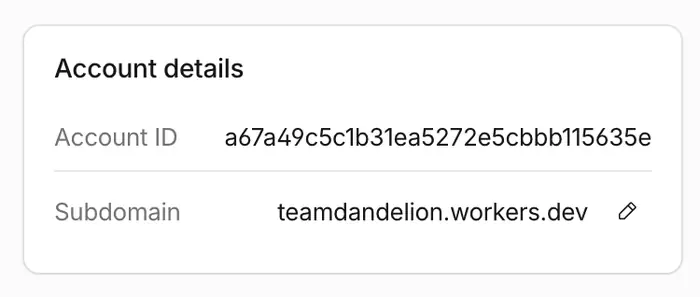
Don't like my-account? On the Workers & Pages page, find Account details and click the pencil next to Subdomain. Note: this changes the address of every site on your account.
មិនចូលចិត្តឈ្មោះ my-account? នៅលើទំព័រ Workers & Pages រក Account details ហើយចុចរូបខ្មៅដៃនៅជាប់ Subdomain។ ចំណាំ៖ វានឹងប្តូរអាសយដ្ឋានរបស់គេហទំព័រទាំងអស់ក្នុងគណនីរបស់អ្នក។
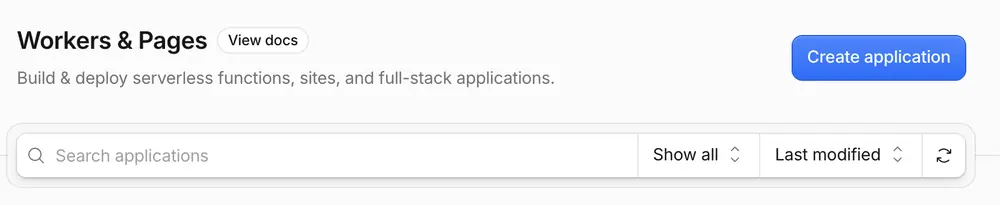
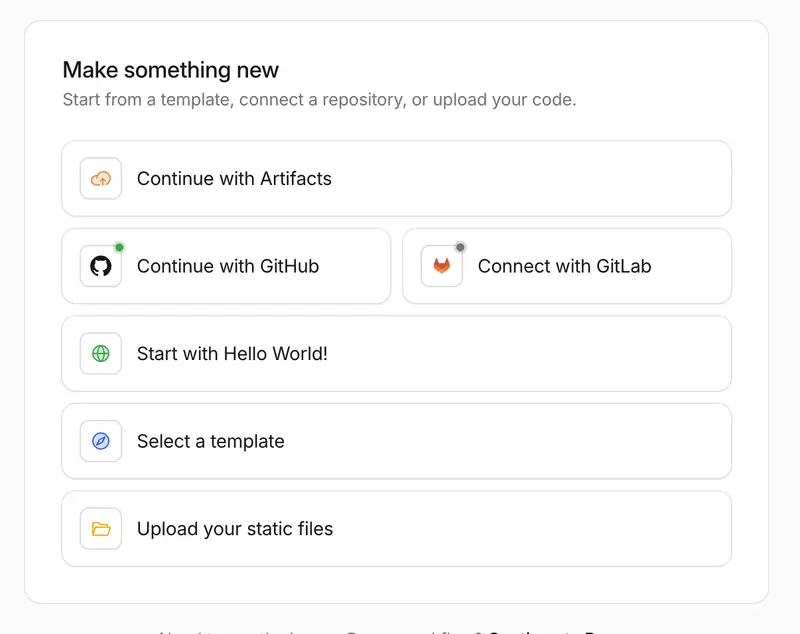
Open Workers & Pages and click the blue Create application button.
បើក Workers & Pages រួចចុចប៊ូតុងពណ៌ខៀវ Create application។
Click Continue with GitHub, then pick your repository and deploy. Each time you push to GitHub, your site updates by itself.
ចុច Continue with GitHub បន្ទាប់មកជ្រើសរើស repository របស់អ្នក ហើយ deploy។ រាល់ពេលអ្នក push ទៅ GitHub គេហទំព័ររបស់អ្នកនឹងធ្វើបច្ចុប្បន្នភាពដោយខ្លួនឯង។
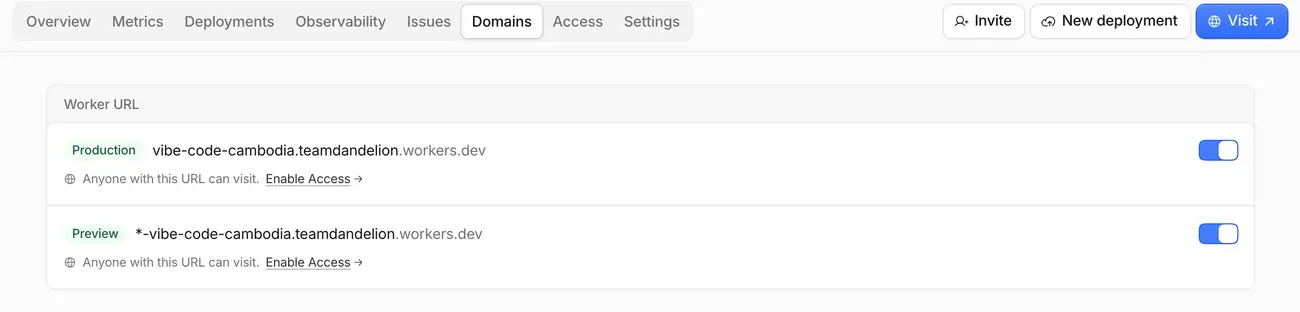
Open the Domains tab and turn ON the toggles next to your workers.dev URLs (they turn blue). If they're off, your website address won't open.
បើកផ្ទាំង Domains ហើយបើក (ON) ប៊ូតុងបិទ/បើក នៅជាប់អាសយដ្ឋាន workers.dev របស់អ្នក (វានឹងប្រែជាពណ៌ខៀវ)។ ប្រសិនបើវាបិទ អាសយដ្ឋានគេហទំព័ររបស់អ្នកនឹងមិនបើកទេ។
Namecheap
Namecheap lets you buy a cheap domain name when you want your own custom address instead of workers.dev.
Namecheap អនុញ្ញាតឱ្យអ្នកទិញឈ្មោះដែន (domain) ក្នុងតម្លៃថោក នៅពេលអ្នកចង់បានអាសយដ្ឋានផ្ទាល់ខ្លួន ជំនួសឱ្យ workers.dev។
Stuck? Ask Claude.
ជាប់គាំង? សួរ Claude។
You can always ask Claude for help — and Claude speaks Khmer! Ask in Khmer and it will answer in Khmer.
អ្នកអាចសុំជំនួយពី Claude បានជានិច្ច — ហើយ Claude ចេះនិយាយភាសាខ្មែរ! សួរជាភាសាខ្មែរ វានឹងឆ្លើយតបជាភាសាខ្មែរ។
Claude Design
Click Design in the Claude app sidebar to make visuals just by describing them — social media posts, posters, flyers, landing page mockups. This cheat sheet was made with it!
ចុច Design នៅរបារចំហៀងនៃកម្មវិធី Claude ដើម្បីបង្កើតរូបភាព ដោយគ្រាន់តែពិពណ៌នាវា — ប្រកាសបណ្តាញសង្គម ផ្ទាំងរូបភាព ខិត្តប័ណ្ណ ឬគំរូគេហទំព័រ។ សន្លឹកជំនួយនេះក៏ត្រូវបានបង្កើតដោយវាដែរ!
A vibe coding workshop at New Hope Cambodia
Build a real website by talking to AI.
បង្កើតគេហទំព័រជាមួយ AI
No coding experience needed. Describe the website you want, watch the AI build it, and publish it to the internet by the end of the week.មិនចាំបាច់មានបទពិសោធន៍សរសេរកូដទេ។ ពិពណ៌នាគេហទំព័រដែលអ្នកចង់បាន មើល AI បង្កើតវា ហើយដាក់វានៅលើអ៊ីនធឺណិតត្រឹមចុងសប្តាហ៍។
Get started · ចាប់ផ្តើម
Send this message to Claude.
ផ្ញើសារនេះទៅ Claude។
Claude will help you set up your computer and build your website, one step at a time.Claude នឹងជួយអ្នករៀបចំកុំព្យូទ័រ និងបង្កើតគេហទំព័ររបស់អ្នក ម្តងមួយជំហាន។
- 1
Install the Claude app and sign in. On Windows, install Git first. How? ធ្វើដូចម្តេច?ដំឡើងកម្មវិធី Claude ហើយចូលគណនី។ នៅលើ Windows សូមដំឡើង Git ជាមុនសិន។
- 2
Open the Code tab. បើកផ្ទាំង Code។
- 3
Copy this message, paste it in, and press Enter. ចម្លងសារនេះ បិទភ្ជាប់វា ហើយចុច Enter។
I’m a student in Cambodia, learning to use Claude Code to build software. My instructor gave me this message to start with.ខ្ញុំជាសិស្សនៅកម្ពុជា កំពុងរៀនប្រើ Claude Code ដើម្បីបង្កើតកម្មវិធី។ គ្រូរបស់ខ្ញុំបានផ្តល់សារនេះឱ្យខ្ញុំ សម្រាប់ចាប់ផ្តើម។
Please don’t assume I know anything about programming, or that I speak English well. Use short, simple English, and add a Khmer translation under your messages. If I write in Khmer, reply in Khmer.សូមកុំសន្មតថាខ្ញុំចេះអ្វីអំពីការសរសេរកម្មវិធី ឬថាខ្ញុំចេះភាសាអង់គ្លេសច្បាស់។ សូមប្រើភាសាអង់គ្លេសខ្លីៗ និងសាមញ្ញ ហើយបន្ថែមការបកប្រែជាភាសាខ្មែរនៅក្រោមសាររបស់អ្នក។ ប្រសិនបើខ្ញុំសរសេរជាភាសាខ្មែរ សូមឆ្លើយជាភាសាខ្មែរ។
My instructor made the GitHub template repo teamdandelion/vibe-code-cambodia to help me get started. Please help me, one step at a time:គ្រូរបស់ខ្ញុំបានបង្កើត GitHub template repo teamdandelion/vibe-code-cambodia ដើម្បីជួយខ្ញុំចាប់ផ្តើម។ សូមជួយខ្ញុំ ម្តងមួយជំហាន៖
1. Set up my computer for software development. It may be a Mac or Windows. (The repo has guides in docs/mac-setup.md and docs/windows-setup.md.) 2. Make a GitHub account if I don’t have one, and connect it to this computer. 3. Make my own repo from the template, and get the website running on my computer. 4. Help me turn it into my own website.១. រៀបចំកុំព្យូទ័ររបស់ខ្ញុំសម្រាប់ការអភិវឌ្ឍកម្មវិធី។ វាអាចជា Mac ឬ Windows។ (repo មានការណែនាំនៅក្នុង docs/mac-setup.md និង docs/windows-setup.md។) ២. បង្កើតគណនី GitHub ប្រសិនបើខ្ញុំមិនទាន់មាន ហើយភ្ជាប់វាទៅកុំព្យូទ័រនេះ។ ៣. បង្កើត repo ផ្ទាល់ខ្លួនរបស់ខ្ញុំពី template ហើយធ្វើឱ្យគេហទំព័រដំណើរការនៅលើកុំព្យូទ័ររបស់ខ្ញុំ។ ៤. ជួយខ្ញុំប្តូរវាឱ្យក្លាយជាគេហទំព័រផ្ទាល់ខ្លួនរបស់ខ្ញុំ។
Ask me questions to find out what I’d like to build, and work with me. Explain each step before you do it, and wait for me when I need to do something myself.សួរខ្ញុំសំណួរ ដើម្បីដឹងថាខ្ញុំចង់បង្កើតអ្វី ហើយធ្វើការជាមួយខ្ញុំ។ ពន្យល់ជំហាននីមួយៗ មុនពេលអ្នកធ្វើវា ហើយរង់ចាំខ្ញុំ នៅពេលខ្ញុំត្រូវធ្វើអ្វីមួយដោយខ្លួនឯង។
- lines of code to memorize
- 0
- lines of code to memorizeបន្ទាត់កូដដែលត្រូវទន្ទេញ
- live website each
- 1
- live website eachគេហទំព័រផ្ទាល់ខ្លួនម្នាក់មួយ
- to publish it
- $0
- to publish itដើម្បីដាក់វាលើអ៊ីនធឺណិត
How it works · របៀបដំណើរការ
Four steps from idea to live website.
បួនជំហាន ពីគំនិតមួយ ទៅជាគេហទំព័រដែលដំណើរការពិតប្រាកដ។
- 🧰01
Choose a stackជ្រើសរើស stack
Pick the technology the AI will use. AI can help you choose. This week, it’s chosen for you.ជ្រើសរើសបច្ចេកវិទ្យាដែល AI នឹងប្រើ។ AI អាចជួយអ្នកជ្រើសរើសបាន។ សម្រាប់វគ្គនេះ យើងបានជ្រើសរើសរួចហើយ។
- 💬02
Promptប្រាប់ AI
Describe the website you want, in plain words. English or Khmer.ពិពណ៌នាគេហទំព័រដែលអ្នកចង់បាន ជាពាក្យសាមញ្ញ។ ភាសាអង់គ្លេស ឬភាសាខ្មែរក៏បាន។
- 🔁03
Iterateកែលម្អម្តងហើយម្តងទៀត
Check the result and tell the AI what to improve. Repeat! This is the real skill.ពិនិត្យលទ្ធផល ហើយប្រាប់ AI ពីអ្វីដែលត្រូវកែ។ ធ្វើម្តងទៀត! នេះគឺជាជំនាញពិតប្រាកដ។
- 🚀04
Ship itដាក់ឱ្យប្រើ
Publish it to the internet, free, at a link you can share.ដាក់វានៅលើអ៊ីនធឺណិត ដោយឥតគិតថ្លៃ ជាមួយតំណភ្ជាប់ដែលអ្នកអាចចែករំលែកបាន។
AI turns out to be very good at writing code. So the most useful skill now is knowing what to ask for.
AI ពិតជាពូកែសរសេរកូដណាស់។ ដូច្នេះ ជំនាញដែលមានប្រយោជន៍បំផុតនាពេលនេះ គឺការដឹងថាត្រូវស្នើសុំអ្វី។
Lessons · មេរៀន
Start here.
ចាប់ផ្តើមនៅទីនេះ។
Before you start · មុនពេលចាប់ផ្តើម
What you need
អ្វីដែលអ្នកត្រូវការ
That's the whole list. Everything else, the AI will help you install.នោះហើយជាបញ្ជីទាំងមូល។ អ្វីៗផ្សេងទៀត AI នឹងជួយអ្នកដំឡើង។
- ✓
An ideaគំនិតមួយ
A business, a project, a club — anything you would want a website for.អាជីវកម្ម គម្រោង ក្លឹប — អ្វីក៏បានដែលអ្នកចង់មានគេហទំព័រ។
- ✓
A computerកុំព្យូទ័រមួយ
Mac or Windows. You will set it up yourself, with the AI as your guide.Mac ឬ Windows។ អ្នកនឹងរៀបចំវាដោយខ្លួនឯង ដោយមាន AI ជាអ្នកណែនាំ។
- ✓
A GitHub accountគណនី GitHub
Free. This is where your website’s files are kept safe. We make it together on Day 1.ឥតគិតថ្លៃ។ ជាកន្លែងរក្សាទុកឯកសារគេហទំព័ររបស់អ្នកដោយសុវត្ថិភាព។ យើងបង្កើតវាជាមួយគ្នានៅថ្ងៃទី ១។
- ✓
A Cloudflare accountគណនី Cloudflare
Free. This puts your website on the internet.ឥតគិតថ្លៃ។ វាដាក់គេហទំព័ររបស់អ្នកនៅលើអ៊ីនធឺណិត។
Questions
សំណួរ
Do I need to know how to code?តើខ្ញុំត្រូវចេះសរសេរកូដទេ?+
No. You will see some code, and you will learn what it is, but the AI writes it. Your job is to know what you want and to say it clearly.ទេ។ អ្នកនឹងឃើញកូដខ្លះ ហើយនឹងរៀនថាវាជាអ្វី ប៉ុន្តែ AI ជាអ្នកសរសេរវា។ ការងាររបស់អ្នក គឺដឹងថាអ្នកចង់បានអ្វី ហើយនិយាយវាឱ្យបានច្បាស់។
Can my website be in Khmer?តើគេហទំព័ររបស់ខ្ញុំអាចជាភាសាខ្មែរបានទេ?+
Yes. You can ask the AI to write in Khmer, or to make the site in both languages. Always have a Khmer speaker check the words — you know the language better than the AI does.បាន។ អ្នកអាចប្រាប់ AI ឱ្យសរសេរជាភាសាខ្មែរ ឬធ្វើគេហទំព័រជាពីរភាសា។ តែងតែឱ្យអ្នកចេះភាសាខ្មែរពិនិត្យពាក្យពេចន៍ — អ្នកស្គាល់ភាសានេះច្បាស់ជាង AI។
Do I keep my website after the workshop?តើខ្ញុំនៅតែមានគេហទំព័ររបស់ខ្ញុំក្រោយវគ្គសិក្សាទេ?+
Yes. Everything is in your own GitHub and Cloudflare accounts. It is yours, and it stays online.បាទ/ចាស។ អ្វីៗទាំងអស់នៅក្នុងគណនី GitHub និង Cloudflare ផ្ទាល់ខ្លួនរបស់អ្នក។ វាជារបស់អ្នក ហើយវានៅតែដំណើរការលើអ៊ីនធឺណិត។
What if the AI makes a mistake?ចុះបើ AI ធ្វើខុស?+
It will! Tell it what is wrong, the same way you would tell a person. If things get really messy, you can always go back to an earlier version.វានឹងធ្វើខុសម្តងម្កាល! ប្រាប់វាថាអ្វីខុស ដូចដែលអ្នកប្រាប់មនុស្សម្នាក់។ ប្រសិនបើអ្វីៗរញ៉េរញ៉ៃខ្លាំង អ្នកតែងតែអាចត្រឡប់ទៅកំណែមុនវិញបាន។